
Your own model
ChatGPT through the Codex app, Claude through Claude Code, or any OpenAI- or Anthropic-compatible endpoint, including local models.
Tell Roqer what you want, and it builds, scripts, and playtests it in the place you have open, using the ChatGPT or Claude subscription you already have.
Free and MIT-licensed · No account · Your own model
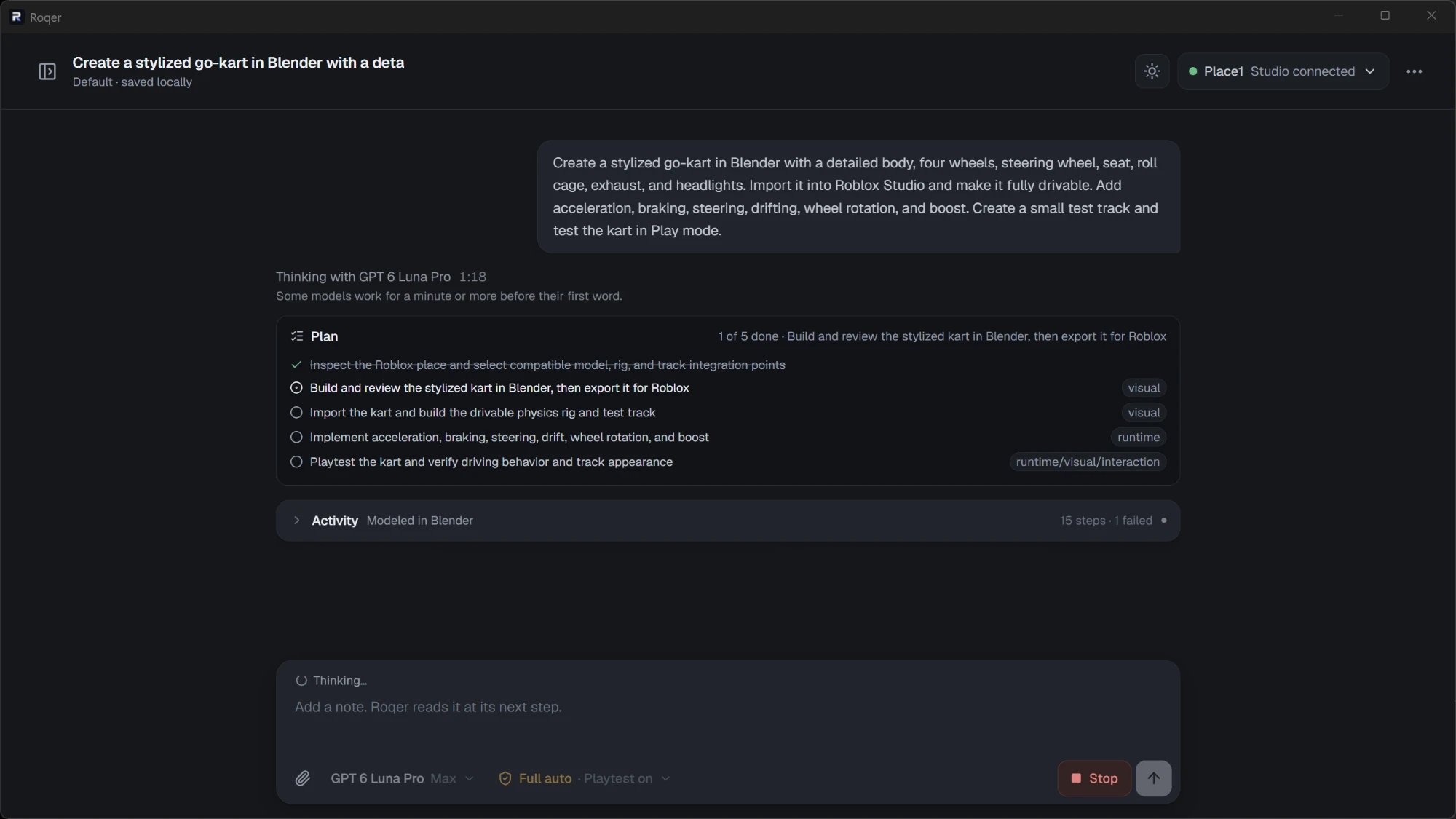
A drivable go-kart, planned in five steps. Roqer works through the plan in Blender and Studio, with playtests on.
View full sizeRoqer reads your place, changes it, and checks the result in a playtest, then shows you what it did.
ChatGPT through the Codex app, Claude through Claude Code, or any OpenAI- or Anthropic-compatible endpoint, including local models.
Reads and edits instances, properties, and scripts. A script edit is refused if the script changed after the agent read it, so it won’t overwrite your own changes.
Runs solo and multi-client playtests, reads server and client output, takes screenshots, and profiles performance.
Choose how much it may do on its own, from Read only to Full auto, and see every script change as a diff.
Turn on the optional Blender integration and the agent models what parts can’t make, checks each model with a preview render, and uploads it into your place.
Bundled Roblox skills, Creator Store search and insertion, and Open Cloud uploads with your own key.
Bring the next task from your own game. Roqer can read your scripts, make changes, and run checks in Studio.
Turn an idea into Luau and UI changes that fit the project you already have.
Example request“Make my inventory fit smaller screens without cutting off the item cards.”
Follow the relevant scripts and runtime logs, then review a focused fix.
Example request“Find out why players sometimes get the same reward twice.”
Run solo or multiplayer playtests and inspect what happens on each client.
Example request“Test this checkpoint with two players and check that each respawns correctly.”
See it repair a broken experience and turn a single prompt into a themed interface.
Follow one task from a broken experience to a working result.
Prompt: “Make a stud-themed shop UI.”

A combo, a dash, and two special attacks, in a Studio playtest against training dummies.
For a task like making an inventory fit smaller screens, here’s how the work moves through Roqer.
Inspect the inventory, its layout, and the scripts that size the cards.
Edit the relevant scripts under your approval mode. See exactly which lines changed.
Run a playtest and inspect the UI at the screen sizes the task calls for.
See the changes, collected checks, and anything that still needs testing.
Review edits first, let routine changes run, or choose Full auto for unattended work. Roqer checks your mode before every action.
| Mode | Read Studio | Undoable edit | Irreversible |
|---|---|---|---|
| Ask first | Runs | Asks you | Asks you |
| Auto approve | Runs | Runs | Asks you |
| Full auto | Runs | Runs | Runs |
| Read only | Runs | Refused | Refused |
Full auto is the default. Change the mode in the composer at any time.
A finished task comes with its changes and collected checks. If a required check is missing or fails, Roqer cannot report a clean result.
Roqer has no account and no server. The agent, its approvals, and your chats, diffs, and run history all stay on your machine.
A model turn can include scripts and tool results used for the task. It goes from your machine straight to the provider you chose, through Codex, Claude Code, or your own endpoint.
Read how your data is handledRoqer’s Studio tools are a standalone MCP server. Connect them to Claude Code, Codex, Cursor, or any other MCP client, with or without the Roqer app.
Set up the Roblox Studio MCP serverThe agent, the Studio plugin, the MCP server, and the Roblox skills are in one public repository. Read what touches your place, change it, and send the change back.
The short answers to what it is, what it costs, and what you need to run it.
Roqer is a free, open-source AI agent for Roblox Studio. It runs on your computer, works in the place you have open, and builds, scripts, and playtests what you ask for, using a model you connect.
Yes. Roqer is MIT-licensed and needs no Roqer account or subscription. You bring the model: your ChatGPT subscription through the Codex app, your Claude subscription through Claude Code, or any OpenAI- or Anthropic-compatible endpoint, including local models. That provider's own prices and usage limits apply.
Yes. Open the place in Roblox Studio, open Roqer, and describe the feature, bug, or test you want handled. It works in the open place instead of requiring a separate upload.
Your place is never uploaded, and Roqer has no server. A model turn can include your prompt, relevant scripts, tool results, and screenshots, and it goes straight from your computer to the model provider you chose.
Yes. Roqer's Studio tools are a standalone MCP server with a Studio plugin, so any MCP client can inspect, edit, and playtest your place through them, with or without the Roqer app.
Windows, Roblox Studio, and a model: ChatGPT with the Codex app, Claude with Claude Code, or an API key or local model server for an OpenAI- or Anthropic-compatible endpoint. macOS is untested.
Install Roqer, open your place, and give it a task.